
Condes 11 released
We are happy to announce the release of Condes 11, with many improvements for everyone who plans courses: a smoother zoom function, no more limit of 5 canvases, Google Street View straight from the map, new options for graphic objects, and more. You will find them under “Also new” below.
If your events need many maps or map variants, or have courses with a map exchange, there is even more to look forward to. The major additions are aimed at exactly these events, and both are now handled more flexibly in Condes, with less manual work at print time.
Your current license works with Condes 11
A Condes license includes three years of updates, no matter if it is a minor or major release. If your license is issued or renewed within the latest 3 years, your license is also valid for Condes 11, so you can upgrade at no extra cost.
No more limit of 5 canvases
For large events or complex layouts. Earlier versions of Condes stopped at 5 canvases. In Condes 11 you can create as many as the event needs. Since each canvas has its own map, printout scale, graphics layout and set of courses, you can use one canvas per genuine variation of the printed map: different map and a forest map in the same event, the same map at 1:10,000 for M16 and 1:7,500 for M55, or the same map with different logos and texts per group of classes.
Print Layouts
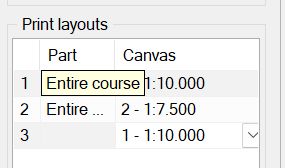
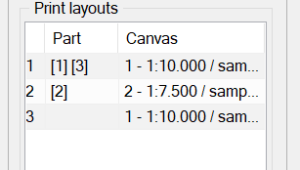
For courses with a map exchange, and for classes that run at different scales. A Print Layout defines which parts of a course are printed together and from which canvas, so a course that starts on one map, continues on a second and returns to the first is printed the way you want it. Classes are matched to a layout by their preferred map scale, so every class gets the right map without choosing it at print time. If your event uses one map at one scale, Condes sets it up for you.
The first figure shows the print layouts for a course that prints at two different print scales.
The second figure shows the print layouts for a course with three parts, where the first and the third part print on one map, and the second part prints on another map.
Print and export several canvases at once
The Print Maps with Courses and Export courses as PDF dialogs list every course with its Print Layouts. Select what you need and print it in a single pass, including multipart courses that combine on one page.
Also new
- Smooth zoom at any level, and Zoom to layout frame. Earlier versions zoomed in fixed steps. Now you can use any zoom level between 20% and 5000%: type a percentage, use Ctrl + mouse wheel, or drag the new zoom slider in the status bar. The new Zoom to layout frame command fits the area that will be printed to the window.
- Google Street View from the map. Click a point, or drag to set the viewing direction. Useful for checking road access, parking and arena areas. The map must be georeferenced.
- Overprint effect and standard course color for graphic objects. Objects blend with the map colors beneath them and can follow the standard course color.
- Japanese is now supported as a screen language
- Event name on the back of the map, so a stack of maps can be identified without exposing the course.