
Can I print the same course at 1:10,000 for M16 and at 1:7,500 for M55?
Yes – and the most effective way to do this is to use two separate canvases. Each canvas can reference the same map file or its own map file at the required scale.
Working with two canvases lets you tailor the graphic layout to each map size, which is especially useful when margins, legends, or control descriptions need different placement.
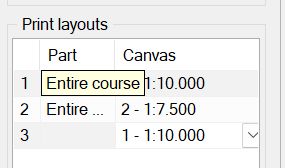
Once your maps and courses are set up, configure the print layouts so each canvas outputs at its intended scale. This ensures both classes receive the correct map scale while still sharing the same underlying course.
Here is how to set up Print Layouts for the course:
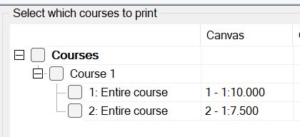
And, when printing, using Print / Print maps with courses …, you have both layouts available:
Now, let’s consider the classes. Each class has a “preferred print scale”, so you can configure M55 to use !:7,500 and M16 to use 1:10,000. This is done in the Classes spreadsheet.
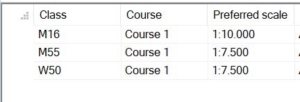
Having configured a preferred scale, each class is automatically assigned to a canvas that prints at the preferred scale.