Sometimes a control circle can be difficult to see against a darkish background. It can therefore be useful to emphasize the control circle by drawing a white outline on the circle.
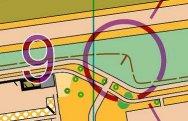
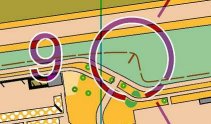
There are different ways to add a white outline on one or several controls. Keep in mind that outline settings are specific to a given canvas.
•Outline all control circles on a canvas
When you want all control circles on a canvas to have white outlines, you should configure the canvas to use outlines. The setting can be found in Additional Dimensions and Fonts in the Course Overprint Symbols and Dimensions dialog.
•Outline individual controls
When you want a small number of circles to have white outlines, you should configure this individually on each control. The setting can be found in Control Circle in the Control dialog. This dialog allows you to override the setting for the canvas; i.e. you can turn on the outline for the control if outlines are not on for the canvas, or turn off the outline if outlines are on for the canvas.
Similarly as for circle outlines, it is possible to add white outlines on control numbers and on course leg lines.